

What "Agentic Automation" Actually Means for Solopreneurs
Let's cut through the buzzwords. Traditional automation follows a strict recipe: If A happens, do B. It’s straight forward, but lacks intelligence.
Agentic Automation is different because it adds a layer of "reasoning". It’s like giving your automation a brain. Instead of just following a recipe, an agent can look at the ingredients, realize one is missing, go find a substitute, and then cook the meal. For a solopreneur, this is the difference between hiring a VA who needs a detailed SOP for everything versus hiring a smart operations manager who figures things out.
My stack isn't just one tool or set of tools, it's a 5-layer cake that handles everything from creative brainstorming to heavy data lifting. Here is exactly how I built it.
The "Digital Team" (Custom Mini Agents)
This is the front line. These are the agents I interact with daily. Think of them as on-demand assistants that know what they need to do.
While tools like Custom GPTs and Claude Projects are excellent, my personal workflow relies heavily on Gemini Gems and Grok Projects.
Context vs. Action
The biggest friction point with AI is "context switching" - copying data from a Doc, pasting it into a chatbot, prompting it, and copying the answer back. It disrupts flow.
- Gemini Gems (Internal Context): I run my life on Google Workspace (Docs, Sheets, Drive, Mail), so Gems are my superpower. Example: A Gem called "Chief Editor" lives inside my ecosystem. It knows my style guide and has access to my "Completed Blogs" folder. I don't paste drafts; I just @-mention it in the document.
- Grok Projects (Real-Time Action): When I need to tap into the "now," I use Grok. It has direct access to real-time social data and news. Example: I use a "Trend Spotter" project to analyze X (Twitter) discussions and summarize noise in accounts of interest, essentially acting as a fast research assistant.

The "Builder" (Agentic IDEs)
If the Digital Team is the staff, this is the factory for complete systems.
Why I Use Antigravity
I am technical, but I am also lazy (efficient?). I don't want to spend my weekends debugging syntax errors. This is where an Agentic IDE changes the game.
First, it looks like a fork of Visual Studio Code with steroids, so basically transforming it into an autonomous coding partner - e.g. ask for changes and it will create a checklist > make a plan > confirm with you > make updates > test changes > autocorrect if anything is wrong and deliver.
Secondly, and personally most shocking to me, you can build a fleet of AI agents, making it into a multi-agent system that can do more than just coding - e.g. conduct keyword research > analyse competitors content > draft a plan > confirm with human > deliver draft.
From Mini-Agents to Master Builder
Here is the secret: Mastering the "Digital Team" tools (Gemini/Grok) effectively acts as a bootcamp for this step. If you can learn how to structure a prompt for a Gemini Gem to follow your brand voice, you are learning the exact same logic needed to direct an Agentic system or IDE to build software. You aren't just learning to chat, you are learning to architect.
How "Agentic Coding" Replaced My Need for Agencies or Freelancers
Before this, if I wanted a custom internal tool - like a customer portal for my SaaS customers - I would have considered hiring a freelancer or a heavy SaaS product. Now, I just "prompt" the software into existence.
Cost to build my custom "Customer Portal": $0 (plus my time). Time to build: 2-3 hours with Antigravity. Quote from an agency: At least $1,000.
The "Orchestrator" (Workflow Automation)
This is the central nervous system. While I use Agentic IDEs to build custom tools, I need something to connect them all together.
Why I Use n8n & Make (Over Zapier)
I personally rely on n8n and Make.com because they allow me to inject "AI Intelligence" directly into the workflow.
Standard automation (like basic Zapier) is linear: New Email -> Save to Sheet. Intelligent Orchestration is dynamic: New Email -> Analyze Sentiment with AI -> If Angry, Draft Apology in Gmail -> If Happy, Ask for Review.
I use Make for quick, visual integrations between my apps (Slack, Gmail, Notion). I use n8n when I need more complex, self-hosted workflows where I want to chain multiple AI agents together in a loop. They are the bridge that lets my "Digital Team" talk to my "Heavy Lifters."
The "Glue" (Scripts & Cloud Run)
Sometimes, you don't need a fancy AI agent. You just need a robust, reliable pipe to move data from Point A to Point B.
When No-Code Isn't Enough: Google AppScript & Python
I see so many founders trying to force Zapier to do things it wasn't meant to do, paying hundreds of dollars a month for "tasks" that a 10-line script could run for free.
My "Glue" layer consists of:
- Google AppScript: For anything involving Sheets, Gmail, Calendar, or JavaScript-based processes. It’s free, serverless, and lives right in the sheet. Example: I have a script that runs every 12 hours, checks a list of RSS feeds of interests, uploads to a Google sheet, and emails me a summary.
- Cloud Run (Python): For heavier scripts that need to run 24/7 or Python-based processes. Example: A complex Python scraper or storing data from APIs, I deploy it here. It costs nothing to a few pennies only when the code runs.
There are other tools like CRON jobs, Google Collab, and others so no need to stick to these I mentioned. They work for me and are simple to use, just stick to what works for your needs.
The "Heavy Lifter" (Traditional ETL)
This is the unsexy part that makes everything else possible.
Why Alteryx & KNIME Still Have a Place
LLMs are smart, but they are terrible at math and processing 100,000 rows of data. If I try to feed a massive CSV of sales data into ChatGPT, it hallucinates, times out, and cost a significant amount.
KNIME (an open-source ETL tool) helps pre-processing data. It cleans, filters, and aggregates the raw numbers before I hand them to the AI agents.
Sample Workflow:
- KNIME sucks in 1,000,000 raw transaction rows.
- It aggregates them into a clean summary: "Sales by Region, Last 30 Days."
- Gemini Gem reads that summary and writes a strategic report.
Don't use an LLM for a calculator's job. Use traditional automation for the heavy lifting, and Agentic Automation for the "thinking."

How It All Fits Together: A Real-World Workflow
Here is how a single task and real use case - "Weekly Industry Trend Report" - flows through this stack without me touching it until the end.
- The Glue (Python Script): Wakes up at 8 AM. Scrapes 10 top industry blogs and subreddits via RSS feeds.
- The Orchestrator (Make): Read Google Sheet, summarise with AI, and send summary to Slack channel.
- The Digital Team (Gemini): Takes those summaries, accesses my "Brand Voice" doc from Drive, and drafts some posts for X and a newsletter intro.
- Output: I get a notification on my phone with a draft ready to review. I tweak it, hit publish, and look like a genius who has read the entire internet before breakfast.
You don’t even need to use all. You can even jump from the script to the Gemini Gem making it a two-step on-demand process for this particular example. Alternatively, if you are dealing with high data volumes, you can integrate heavy lifters like KNIME to filter out noise to make it easier for the AI to summarise.
Tools are just bricks, output is what counts. Don’t overcomplicated.
Conclusion & Final Thoughts
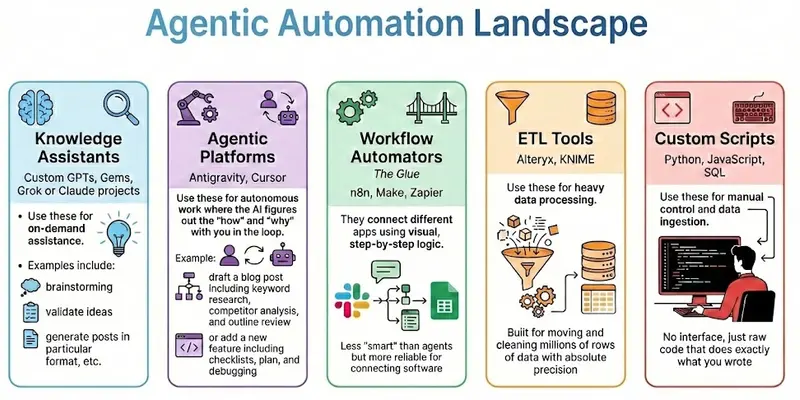
You don’t need to use all of the automation tools/processes at once. Sometimes even one or two maybe sufficient. If you got lost, here is a breakdown of automation tool types with and without AI including when to use each:
- Knowledge Assistants (Custom GPTs, Gems, Grok or Claude projects):
Use these for on-demand assistance (e.g. brainstorming, validate ideas, generate posts in particular format, etc.). - Agentic Platforms (Antigravity, Cursor):
Use these for autonomous work where the AI figures out the "how" and "why" with you in the loop (e.g. draft a blog post including keyword research, competitor analysis, and outline review; or add a new feature including checklists, plan, and debugging). - Workflow Automators (n8n, Make, Zapier):
These are "The Glue". They connect different apps (e.g. Slack to Google Sheets) using visual, step-by-step logic. They are less "smart" than agents but more reliable for connecting software. - ETL Tools (Alteryx, KNIME):
Use these for heavy data processing. They are built for moving and cleaning millions of rows of data with absolute precision. - Custom Scripts (Python/SQL):
Use these for manual control and data ingestion. No interface, just raw code that does exactly what you wrote.